What Is Postman? How to Test APIs Easily (Beginner’s Guide)
If you are learning web development or backend programming, sooner or later you will hear one word again and again — API.
And when APIs come into the picture, Postman almost always follows.
For beginners, API testing sounds complex.
But with the right tool, it becomes simple and even interesting.
That tool is Postman.
This guide explains Postman in a very simple and practical way, especially for beginners.
🔹 What Is Postman?
Postman is a tool that helps developers send requests to APIs and see responses clearly.
In simple words, Postman allows you to:
- Talk to APIs
- Test whether an API is working or not
- See data returned by the server
Instead of writing code, you can test APIs using a clean interface.
🤔 Why Do Developers Use Postman?
Before Postman, developers had to:
- Write test code
- Use browsers with limited features
- Guess API issues blindly
Postman solved these problems.
Key reasons developers love Postman:
- Easy to use for beginners
- No coding required to test APIs
- Clean request and response view
- Saves time during development
🌐 Postman vs Browser (Simple Difference)
Browser:
- Can only send GET requests easily
- Cannot handle headers properly
- Not suitable for testing APIs
Postman:
- Supports GET, POST, PUT, DELETE
- Allows headers, body, tokens
- Made specifically for API testing
That’s why serious API testing is done in Postman, not browsers.
🔄 How Does Postman Work?
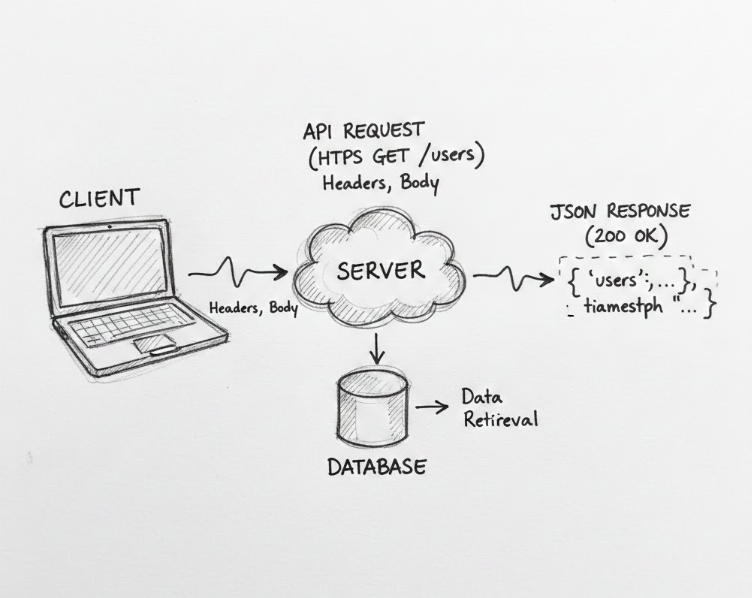
Postman follows a simple process:
- You choose an API endpoint
- Select request type (GET, POST, etc.)
- Add headers or body (if needed)
- Click Send
- See response from the server
That’s it. No magic. No confusion.
📌 Example: Testing a GET API
Let’s say an API gives user data.
Steps in Postman:
- Open Postman
- Select GET
- Enter API URL
- Click Send
Response appears in JSON format:
- User name
- ID
You instantly know whether the API is working.
✉️ Example: Testing a POST API
POST requests are used to send data to a server.
Example:
- Create a new user
- Submit a form
- Save data
In Postman:
- Choose POST
- Add JSON data in body
- Send request
- Check response
This helps developers test backend logic easily.
🧠 Common Mistakes Beginners Make
Many beginners struggle due to small mistakes:
- Forgetting headers (Content-Type)
- Sending wrong request type
- Invalid JSON format
- Missing authentication tokens
Postman helps identify these errors clearly.
👨💻 Who Should Learn Postman?
Postman is useful for:
- Web developers
- Backend developers
- Students learning APIs
- QA testers
- Freelancers
If you work with APIs, Postman is almost mandatory.
🚀 Benefits of Learning Postman Early
- Understand APIs better
- Debug faster
- Build confidence
- Perform better in interviews
- Work smoothly with backend teams
Postman is not just a tool, it’s a skill.
🧾 Final Thoughts
Postman makes API testing simple, visual, and beginner-friendly.
You don’t need advanced programming skills to start using it.
If you are serious about backend or full-stack development, learning Postman is one of the best early decisions you can make.