Native Apps vs Hybrid Apps: Which Build Strategy Delivers Better Experience?
Smartphones have evolved far beyond communication devices. Today, they are the hub of entertainment, business operations, banking, social networking, shopping, and personal productivity. When a company decides to launch a mobile application, the first technical decision that heavily shapes the product’s future is the build strategy. This decision usually boils down to two primary choices: Native Apps and Hybrid Apps.
Both strategies aim to deliver the same outcome — a working app for the end user — but the way they are built, how they perform, how they integrate with device features, and how much they cost are all significantly different.
This article breaks down both approaches from a practical perspective, helping you understand which option delivers a better experience in modern app development.
What Are Native Apps?
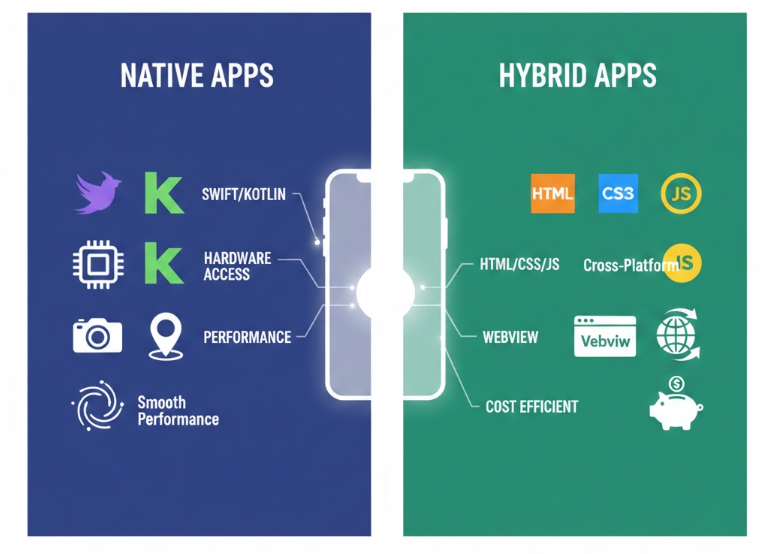
Native apps are applications built using the platform’s official programming languages and SDKs. In simpler terms:
-
Android apps are written using Kotlin or Java
-
iOS apps are written using Swift or Objective-C
Since native apps run directly on the device without any intermediary layer, they can fully utilize the hardware and native APIs, resulting in exceptional performance.
Key Characteristics of Native Apps
-
Fast, smooth UI and animations
-
Deep access to system features (camera, GPS, sensors, NFC, AR, etc.)
-
Consistent platform-specific look and feel
-
Better GPU and CPU utilization
-
Optimized memory management
For demanding applications like games, AR/VR utilities, advanced camera apps, or real-time communication tools, native development is often the default choice.
What Are Hybrid Apps?
Hybrid apps are built using web technologies like HTML, CSS, and JavaScript, and then wrapped inside a native container so they can run on mobile platforms. Internally, they use a browser-like component (WebView) to render content.
Popular hybrid frameworks include:
-
Ionic
-
Cordova (Apache)
-
Framework7
-
Onsen UI
Hybrid development focuses on code sharing and faster delivery rather than maximum hardware utilization.
Key Characteristics of Hybrid Apps
-
Single codebase for Android and iOS
-
Faster development cycles
-
Lower overall cost
-
Easy web-to-app conversion for content-driven products
-
Limited performance compared to native apps
Hybrid apps are suited for apps where the UI does not require heavy animation or deep hardware usage.
User Experience (UX) Comparison
User Experience is a major deciding factor in the success of modern mobile apps. Even small delays, frame drops, and unresponsive gestures can lead to uninstalls and bad reviews.
Native UX
Native apps have a natural advantage in UX because:
-
UI controls match platform standards
-
Scrolling and gestures feel natural
-
Animations generally run at high frame rates (close to 60fps)
-
Transitions are smooth and responsive
Examples like WhatsApp, Instagram, TikTok, and Uber deliver highly polished native experiences that users have come to expect.
Hybrid UX
Hybrid UX depends on the performance of WebView and JavaScript engines. Some common drawbacks include:
-
Occasional frame drops
-
Non-native scrolling momentum
-
Slight input latency
-
Limited gesture support in complex interactions
Hybrid apps perform well in content-heavy environments but struggle with GPU-heavy workloads.
Performance Comparison
Performance becomes critical for apps involving graphics, animations, real-time features, or large datasets.
Native Performance
Native apps benefit from:
-
Direct hardware access
-
No extra interpretation layer
-
Better memory and thread management
-
Faster app startup times
-
Low-latency animations and transitions
This performance edge is why gaming and multimedia apps avoid hybrid technologies.
Hybrid Performance
Hybrid apps rely on WebView, which introduces:
-
Rendering overhead
-
JavaScript bridge latency
-
Weaker GPU access
-
Slower screen updates
However, hybrid apps excel in lightweight use cases like:
-
News apps
-
Blog or article readers
-
Internal enterprise dashboards
-
Simple form-driven applications
Development Speed and Cost
From a business point of view, time to market and development budget are important considerations.
Hybrid Advantages
Hybrid development is appealing because:
-
One codebase works across platforms
-
One team can build both versions
-
Updates are easier and faster
-
MVPs can be shipped in weeks, not months
This makes hybrid development popular among startups and businesses testing new ideas.
Native Trade-Offs
Native development demands:
-
Two separate codebases
-
Specialized teams for Android and iOS
-
Longer QA and deployment windows
While cost is higher, long-term product stability and performance may justify the investment.
Hardware & Feature Access
Mobile apps often require interaction with device hardware.
Native Access
Native apps can easily use:
-
Bluetooth Low Energy
-
Fingerprint & Face ID systems
-
Advanced camera APIs
-
AR frameworks (ARKit, ARCore)
-
High refresh rate displays (90Hz/120Hz)
-
Audio DSP control
-
Background services
Hybrid Limitations
Hybrid apps rely on plugins for hardware features. If plugins are outdated or unavailable, features may lag behind or break.
Maintainability & Scalability
Hybrid apps are easier to maintain initially because of their single codebase. However, long-term scalability may suffer due to dependency on third-party plugins.
Native apps require more investment upfront but scale better because they evolve alongside platform changes.
Real-World Examples
Native Apps
-
Instagram
-
Uber
-
Snapchat
-
PUBG Mobile
-
Spotify
Hybrid Apps
-
Early LinkedIn versions
-
Small enterprise field tools
-
Content-based news apps
Interestingly, LinkedIn originally used a hybrid approach but later switched to native due to performance problems.
Final Verdict: Which Delivers Better Experience?
Both strategies have a place in modern mobile development:
✔ Choose Native When:
-
Hardware access is critical
-
Performance is a priority
-
Complex UI or animations are required
-
Long-term product vision exists
✔ Choose Hybrid When:
-
Budget is limited
-
MVP needs fast release
-
App is content-driven
-
Hardware usage is minimal
In simple terms:
Better Experience = Native
Better Development Speed = Hybrid