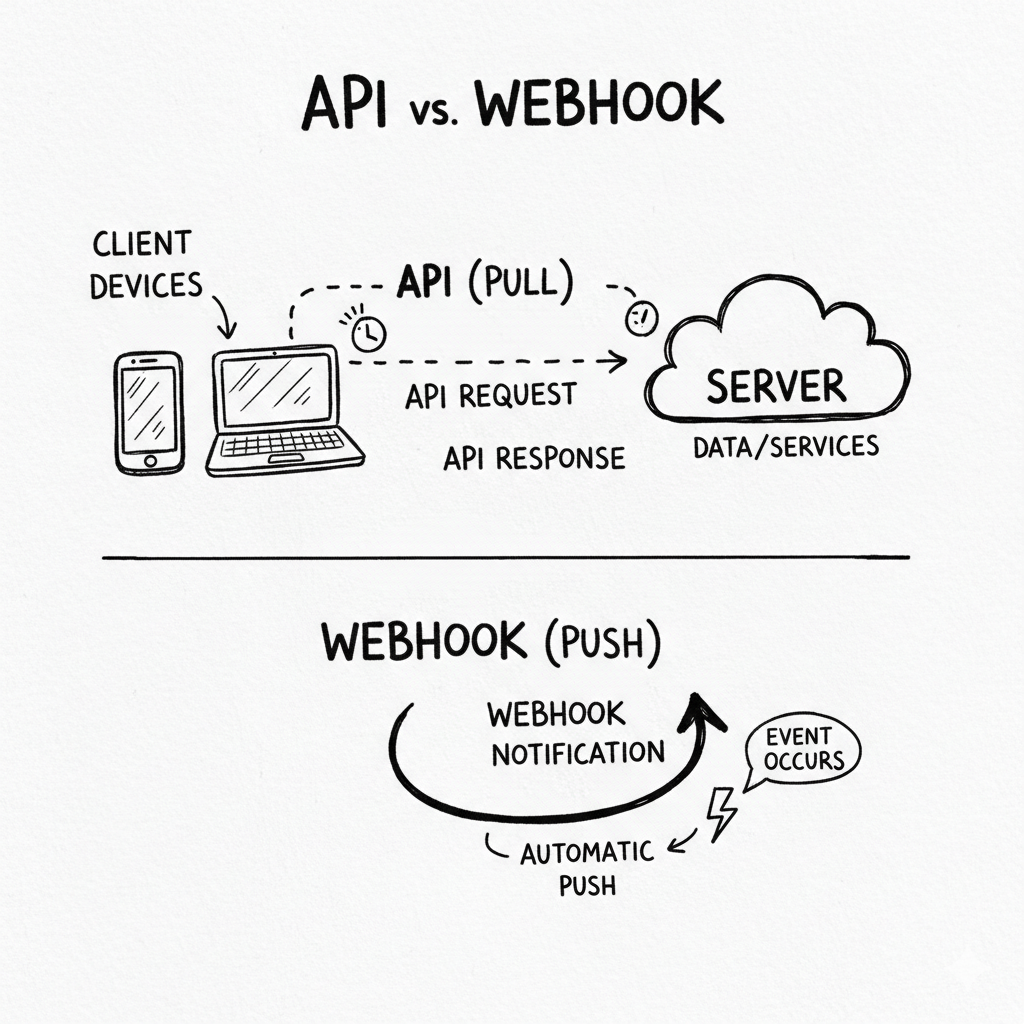
API vs Webhook Explained: Key Differences with Real Examples
In today’s digital world, websites and apps constantly talk to each other.
From online payments and food delivery to emails and notifications, everything depends on how systems exchange data behind the scenes.
Two very common terms you will hear in this process are API and Webhook.
Many beginners (and even developers) get confused:
- Are API and Webhook the same?
- Which one is better?
- When should you use API and when Webhook?
Let’s clear this confusion in a simple and practical way.
What Is an API? (Easy Explanation)
API stands for Application Programming Interface.
In simple words, an API allows one application to request data or services from another application.
Real-Life Example
Think of a restaurant.
- You are the customer
- The kitchen is the server
- The waiter is the API
You ask the waiter for food.
The waiter goes to the kitchen, brings your food, and serves it to you.
👉 You only get food when you ask for it.
That is exactly how an API works.
Tech Example
- You open a weather app
- The app sends a request to a weather API
- The API fetches data from the server
- The app shows you today’s temperature
Important point:
API works on request-response basis.
No request, no data.
What Is a Webhook?
A Webhook works in a different way.
Instead of asking again and again, the system automatically sends data when something happens.
Real-Life Example
Imagine a courier delivery.
When your package reaches your city, you get an SMS:
“Your order has arrived.”
You didn’t ask.
The system informed you automatically.
That is a Webhook.
Tech Example
- A customer completes payment
- Payment gateway sends instant notification to your website
- Your website updates order status automatically
👉 This happens in real time, without asking.
Core Difference Between API and Webhook
The main difference is who starts the communication.
API
You ask:
“Any update?”
“Any data?”
“Has payment completed?”
Webhook
The system tells you:
“Payment completed.”
“Order placed.”
“Event happened.”
API vs Webhook – Simple Comparison
API
- Client sends request
- Works on polling
- More server calls
- Easy to understand
- Great for dashboards and user actions
Webhook
- Server sends data automatically
- Event-based
- Fewer server calls
- Real-time updates
- Best for automation
Real-World Use Cases
E-commerce Website
- Showing product list → API
- Sending order confirmation email → Webhook
Payment System
- Checking payment status manually → API
- Getting instant payment success alert → Webhook
Email Service
- Fetching inbox emails → API
- Getting notified when new email arrives → Webhook
When Should You Use an API?
Use API when:
- User is actively requesting data
- You need filtered or custom data
- You are building dashboards or reports
Examples:
- User profile details
- Order history
- Product search
When Should You Use a Webhook?
Use Webhook when:
- You want instant updates
- An action happens automatically
- You want to reduce server load
Examples:
- Payment success
- Order status change
- Automatic email or SMS
Security Considerations
Security is important in both cases.
- APIs use API keys, tokens, or OAuth
- Webhooks use secret keys and signature verification
If Webhooks are not secured properly, fake data can be sent.
That’s why verification is very important.
Which One Is Better?
Honestly, there is no winner.
API and Webhook are not competitors.
They are used together in most real-world systems.
- API gives control
- Webhook gives speed
Professional applications use API + Webhook combination.
Final Thoughts
If you are a beginner:
- First understand APIs clearly
- Then move to Webhooks
Once you understand both, modern backend systems will start making sense.
Instead of thinking “API vs Webhook”, think:
“API and Webhook together”.
That’s how real-world applications work.